
Forgalis TradingJournal Review: A Comprehensive And Powerful Trading Journal For Serious Traders
Category: Trading Guides | Author: Trading Brokers | Date: October 9, 2026
Introduction To Forgalis TradingJournal
Successful trading involves far more than finding attractive market opportunities and executing positions. It requires discipline, effective risk management, consistent decision-making, and the ability to evaluate previous performance objectively. While trading platforms provide the tools necessary to enter and exit financial markets, they do not always offer the detailed performance analysis and personal reflection capabilities that traders need to improve their approach.
OUR #1 BROKER 2026

Plus500 is a regulated and leading broker providing CFD Trading and Futures Trading (USA) with excellent trading conditions.
This is where Forgalis TradingJournal establishes itself as an impressive and highly practical trading journal solution.
Forgalis TradingJournal, commonly referred to as FTJ, is a dedicated Windows desktop application designed to help traders record their transactions, analyse performance, document strategies, track trading mistakes, and develop a more structured review process.
The software combines comprehensive trade recording with sophisticated analytical tools, performance reports, broker integrations, screenshot management, and detailed trading psychology features. Its local-first architecture provides an additional advantage for traders who prefer maintaining their journal database directly on their computers rather than relying entirely on cloud-based systems.
One of the platform’s most attractive qualities is its ability to bring together information that traders would otherwise need to maintain across several applications. Instead of switching between broker statements, spreadsheets, chart screenshots, and handwritten notes, users can organise their trading activity within a single dedicated environment.
Forgalis TradingJournal also offers compatibility with MetaTrader 4, MetaTrader 5, and cTrader, making it particularly appealing to Forex and CFD traders who already use these established trading platforms.
With its accessible pricing, permanent free Demo, advanced reporting capabilities, and extensive trade review functionality, Forgalis TradingJournal presents a compelling option for traders seeking a more professional approach to trading performance evaluation.
What Is Forgalis TradingJournal?
Forgalis TradingJournal is a trading journal and performance analysis application developed by Forgalis AB.
Its primary purpose is to help traders capture the details of their trading activity and transform those records into useful insights.
Unlike a broker’s trading terminal, Forgalis TradingJournal does not execute orders or manage positions directly in the financial markets. Instead, it operates as a dedicated environment for documenting trades, examining historical results, and reviewing the decisions behind each position.
This distinction is important because trading success cannot be accurately assessed through account balances or isolated winning trades alone.
A profitable position may have resulted from poor execution or excessive risk, while an unsuccessful position might have followed a carefully constructed trading plan.
Forgalis TradingJournal helps traders investigate these differences by providing a structured framework for recording both the numerical and behavioural aspects of trading.
Users can document entry and exit information, associate positions with specific strategies, attach chart screenshots, maintain pre-trade plans, record post-trade observations, and evaluate individual trades through detailed self-reflection.
The platform also includes a sophisticated reporting environment that examines strategy performance, trading mistakes, execution timing, risk/reward relationships, drawdown, and other important statistics.
The result is a versatile desktop application that can support both straightforward trade tracking and more advanced performance evaluation.
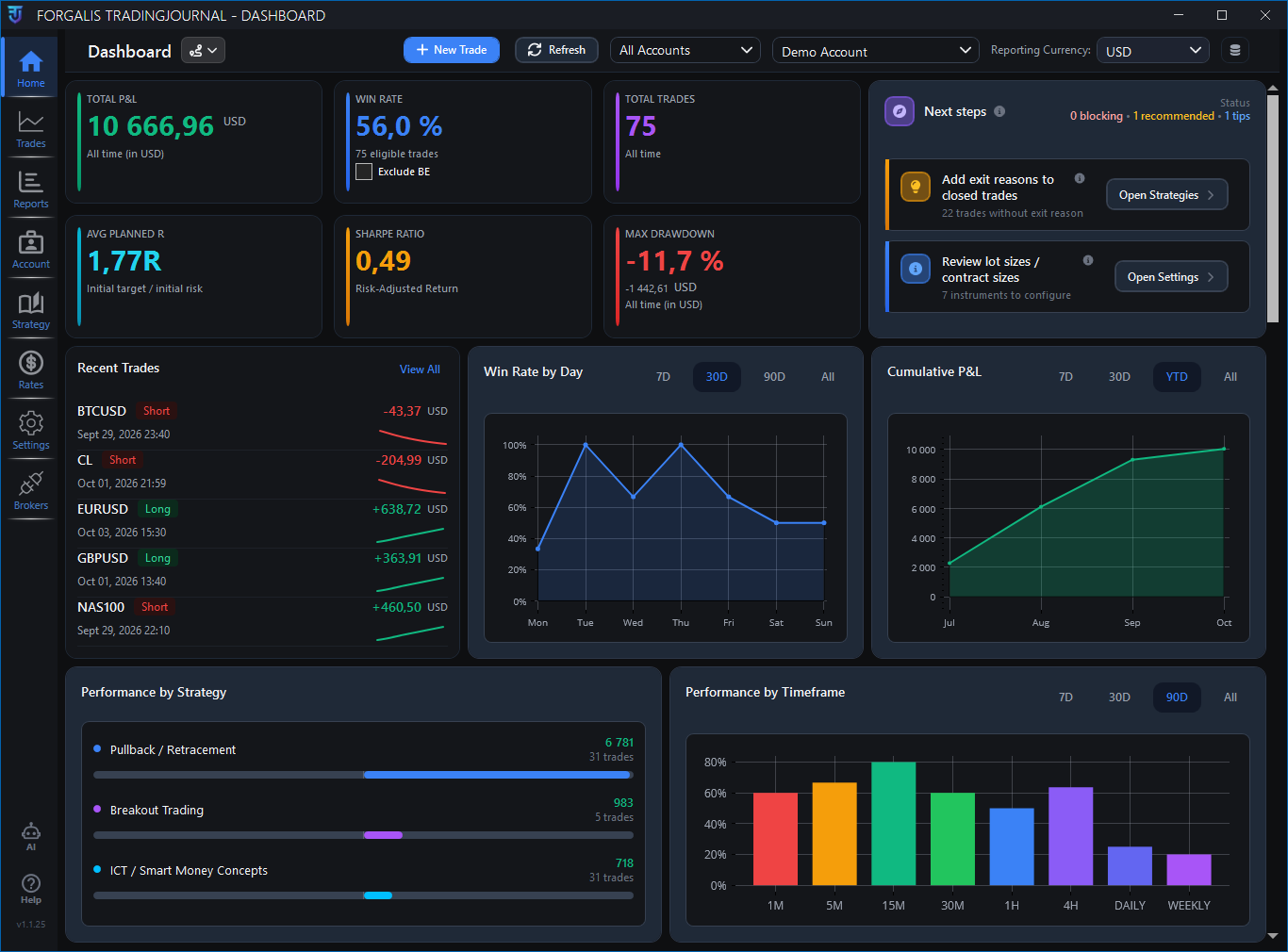
Forgalis TradingJournal
A Professional Windows Trading Journal Experience
One of the defining characteristics of Forgalis TradingJournal is its dedicated Windows desktop environment.
Rather than building its primary workflow around an online account dashboard, the software provides a native application designed for maintaining and reviewing trading records directly on a Windows computer.
This approach offers several practical benefits.
Traders can keep their journal separate from browser tabs and unrelated online applications. The desktop interface also provides a central workspace where trade records, accounts, strategies, images, and reports remain connected.
The software organises its functionality into dedicated sections, including Dashboard, Reports, Trades, Accounts, Strategy, Rates, Brokers, and Settings.
Each section serves a particular purpose while contributing to the same overall journaling process.
For example, a trader might begin by reviewing performance statistics on the Dashboard, identify an unusual result, open the related transaction in Trades, and inspect its strategy, screenshots, execution history, and self-reflection notes.
This integrated workflow is one of the reasons Forgalis TradingJournal offers substantially more functionality than a basic trading spreadsheet.
The interface also uses collapsible sections to keep detailed trade information organised without unnecessarily overwhelming the user.
Areas such as Strategy & Confluences, Images, Trade Notes, Executions & Stop History, and Self-Reflection can be expanded when needed.
The application remembers certain workspace preferences between sessions, making it more convenient for traders who regularly follow the same review routine.
Comprehensive Trading Dashboard
The Dashboard is one of the central features of Forgalis TradingJournal.
It provides a consolidated overview of trading performance, combining key statistics, charts, recent activity, filters, and guidance into one workspace.
For traders who want to monitor progress without inspecting every individual transaction, this offers a convenient starting point.
Important Trading Performance Indicators
The Dashboard includes several important performance measurements, depending on available trade data.
These include total profit and loss, win rate, the number of closed trades, average planned risk/reward, maximum drawdown, and supported risk-adjusted statistics.
Each metric provides a different perspective on trading performance.
Win rate indicates the proportion of qualifying closed trades that produced a positive result.
Total profit and loss provides an overview of realised monetary performance within the selected reporting scope.
Maximum drawdown helps users understand the depth of historical declines in their recorded trading results.
Average Planned R examines the reward originally targeted relative to initial risk, using trades with sufficient planning information.
Where adequate data exists, the Dashboard can also display risk-adjusted statistics such as Sharpe-related measurements.
Together, these indicators provide a more meaningful overview than the final result of any single trade.
Performance Charts And Visual Analysis
Forgalis TradingJournal supplements numerical statistics with visual performance charts.
Depending on the available data and software configuration, these charts can include cumulative profit and loss progression, individual trade results, win/loss breakdowns, and other performance views.
Visual presentation makes it easier to recognise trends that might be difficult to identify from a table of transactions alone.
A trader can examine whether performance has developed consistently, whether substantial declines occurred during particular periods, and how individual outcomes contributed to the broader record.
Live And Demo Account Filtering
The Dashboard supports filtering between live accounts, demo accounts, and all available accounts.
Users can also select individual trading accounts for more focused analysis.
This is especially useful for traders who operate several accounts or maintain separate environments for experimentation and live trading.
By separating these results, users can evaluate performance without unintentionally combining records that serve different purposes.
Intelligent Journal Guidance
An especially useful feature is the Dashboard’s guidance functionality.
Rather than concentrating exclusively on trading results, the software can identify areas where journal data may be incomplete.
For example, it can highlight missing exchange rates, incomplete trade information, unassigned strategy classifications, missing exit reasons, or the need to back up the journal database.
This is a thoughtful addition because accurate performance analysis depends on the quality of the underlying records.
The guidance system does not recommend trades or judge market opportunities. Its purpose is to help users maintain a more complete and reliable journal.

Forgalis TradingJournal Trades workspace
Advanced Trade Recording And Management
Forgalis TradingJournal provides a detailed trade management environment suitable for both manually entered positions and imported broker records.
Each trade can contain a substantial amount of information, allowing traders to preserve the original setup, execution details, trading costs, and later observations.
Manual Trade Entry
The software allows users to create trades manually without connecting a broker.
This is particularly useful for traders whose platforms are not directly supported or who prefer complete control over their records.
The trade entry interface can accommodate instrument information, direction, entry date and time, entry price, quantity, account, currency, trading session, timeframe, and relevant risk management details.
Additional information can be added throughout the trade’s lifecycle.
A position may initially be recorded with entry information and a trading plan, then updated after closing to include exit details, screenshots, notes, and reflections.
Detailed Entry And Exit Cards
Forgalis TradingJournal separates important trade information into dedicated Entry and Exit cards.
The Entry card focuses on the trade’s original setup and risk planning.
It includes fields such as initial stop-loss, initial take-profit, planned reward relative to risk, and position sizing.
The Exit card concentrates on the completed transaction.
Where supported, it displays average exit price, realised profit and loss, fees, swap, exit reasoning, and Realised R.
This structure is particularly valuable because it keeps the original trading plan distinct from the final outcome.
Trade Search And Filtering
The Trades workspace also includes searching, sorting, and filtering functionality.
Users can narrow their records by criteria such as account, instrument, direction, or date.
Previous and next navigation follows the filtered trade list, allowing traders to review selected groups of positions efficiently.
This makes Forgalis TradingJournal particularly practical for users maintaining a substantial trading history.
Advanced Multiple Take-Profit Planning
One of the platform’s most noteworthy features is its support for multiple planned take-profit targets.
Many traders do not close their entire position at a single price. Instead, they may plan to close different portions of a trade at several target levels.
Forgalis TradingJournal accommodates this approach through its Planned Targets functionality.
Users can create multiple targets, including TP1, TP2, and additional levels, then assign percentage allocations to each.
The application uses these allocations to calculate a weighted Planned R value based on the trade’s original risk.
This provides a more realistic representation of the trader’s intended reward profile than a single take-profit level.
Importantly, the platform distinguishes between planned targets and actual trade execution.
Changing a planned target does not rewrite the broker’s recorded fills or alter the realised outcome.
This separation is a major advantage for traders who want to compare their intentions with what actually happened.
For discretionary traders, partial-profit strategies, and more advanced position management approaches, this feature adds considerable analytical value.
Planned Risk Versus Realised Risk
Another important strength of Forgalis TradingJournal is the distinction it makes between Planned R and Realised R.
These two measurements represent different aspects of trading performance.
Planned R describes the reward targeted relative to the original risk established at entry.
Realised R describes the actual completed outcome relative to that original risk.
The distinction is essential for evaluating whether a trader’s execution matched the intended trading plan.
For example, a position may have been designed to target a substantial reward relative to risk, but the final result may be much smaller because of an early exit.
Conversely, a trade may have been managed differently from the original plan and produced an unexpectedly large outcome.
Forgalis TradingJournal helps preserve this distinction rather than treating all risk/reward measurements as interchangeable.
The software also avoids presenting misleading Realised R values when the required initial risk or profit-and-loss information is missing.
This is an important design decision because incomplete trade data can otherwise create inaccurate performance statistics.
Execution-Level Trade Tracking
Forgalis TradingJournal goes beyond simple entry and exit records by supporting detailed execution-level information.
This is especially useful for traders whose positions involve multiple fills, partial closes, or more complex execution histories.
Individual Trade Executions
A position may involve several transactions rather than one entry and one exit.
Forgalis TradingJournal can organise these individual executions and derive position-level information from the underlying fills.
Depending on the trade and available data, the application can calculate weighted average entry and exit prices, quantities, timestamps, direction, and position status.
This provides a more accurate representation of how a trade developed.
Execution Management
The software also provides execution management functionality for supported records.
Available actions can include adding, editing, grouping, linking, splitting, or merging executions where appropriate.
Closed execution-based trades can be protected against accidental changes, helping preserve the integrity of completed records.
Broker-Reported And Calculated Results
Another sophisticated capability is the option to work with broker-reported or calculated profit and loss for eligible imported trades.
Broker-reported results use available booked monetary values supplied by the trading platform.
Calculated results derive gross profit and loss from execution information and relevant conversion data.
Providing these alternatives gives traders useful flexibility when reviewing imported records.
Trading Cost Adjustments
Forgalis TradingJournal also supports separate adjustments for fees and swap on eligible trades.
This allows users to make relevant journal corrections while preserving original broker-reported values.
For traders who prioritise detailed record accuracy, these execution and cost-management capabilities are substantial advantages.
Stop-Loss History And Trade Management Review
One of the more advanced features documented for Forgalis TradingJournal is its ability to maintain an observed stop-loss history.
When supported broker integrations provide suitable information, FTJ can record stop-loss states observed during synchronisation.
This makes it possible to distinguish between the original stop-loss and later trade management decisions.
For example, a trader may initially set a stop based on market structure and subsequently move it to break-even.
Forgalis TradingJournal can preserve the initial risk-defining stop while recording observed changes separately.
This is important because altering the original stop-loss would distort the trade’s initial risk profile.
The application can also identify observed stop levels placed at the entry price, providing useful context for reviewing break-even management.
The software does not claim to reconstruct stop changes that were never observed by the supported broker workflow. Recorded observation times represent when FTJ saw those states rather than necessarily when the broker originally changed them.
This careful distinction reinforces the platform’s emphasis on maintaining meaningful and defensible trade records.
MetaTrader 4 And MetaTrader 5 Integration
Compatibility with MetaTrader 4 and MetaTrader 5 is a significant advantage for Forgalis TradingJournal.
Both trading platforms are extensively used in the Forex and CFD markets, making their inclusion particularly relevant for the software’s target audience.
MetaTrader 4 Trade Imports
Forgalis TradingJournal supports MetaTrader 4 history imports through a local terminal and bridge workflow.
The integration uses a dedicated MT4 bridge component that works with the selected MetaTrader terminal.
Traders can connect the supported workflow, review available executions, and import selected records into their journal.
This provides a convenient method for transferring historical trading activity into an environment designed for deeper analysis.
MetaTrader 5 Trade Imports
MetaTrader 5 compatibility provides similar benefits for traders using the newer MetaTrader platform.
FTJ supports the relevant local terminal and bridge workflow, allowing available account history to be brought into the journal.
The platform’s ability to work with both MT4 and MT5 is particularly beneficial for traders who use multiple brokers or have transitioned between MetaTrader versions.
Read-Only Broker Integration
A particularly reassuring aspect of these integrations is that they are designed for read-only history retrieval.
Forgalis TradingJournal does not use its broker integration to open, modify, or close positions.
Trading activity remains within the broker’s execution environment.
This clear separation allows users to benefit from trade history imports without turning the journal into an order-execution application.
Broker Connection Management
The software also includes tools for managing terminal references, account links, and supported bridge components.
Its documentation explains compatibility requirements and bridge update procedures.
This is helpful because MetaTrader installation arrangements can vary between brokers and computers.
cTrader Integration And Trade Synchronisation
Forgalis TradingJournal also supports cTrader, expanding its compatibility beyond the MetaTrader ecosystem.
The cTrader connection uses an OAuth-based authorisation workflow.
This allows users to authorise supported account-history access without providing their broker password directly to the journal.
Once connected, available executions can be fetched or previewed and associated with the relevant FTJ trading account.
The platform supports reconciling some open broker positions when later synchronisation provides sufficient closing information.
For example, a position imported while open may subsequently be updated in the journal after it closes on the broker platform.
This makes FTJ useful for traders who want to maintain their records through repeated history synchronisation rather than relying exclusively on one-time exports.
It is important to distinguish this capability from continuous, guaranteed real-time broker monitoring. Availability and completeness depend on the supported workflow and information exposed by the platform.
Nevertheless, cTrader support is an important feature that broadens the software’s usefulness.

Forgalis TradingJournal Brokers
CSV And XLSX Import Capabilities
Not every trading account can be connected through the supported broker integrations.
Forgalis TradingJournal addresses this through file-based importing.
The application supports compatible CSV and XLSX trading history files, providing an additional route for transferring existing records.
This is valuable for users who export their trading data through broker portals, spreadsheets, or other reporting systems.
The import process allows available information to be brought into the journal, where users can add missing context and review fields.
The software also uses source identifiers and other trade details to reduce unintended duplicate imports.
This can be particularly useful when traders periodically import overlapping portions of historical data.
As with any structured import system, the quality and completeness of imported information depend on the available source fields and format compatibility.
Overall, the combination of manual entry, file imports, and platform-specific broker workflows gives Forgalis TradingJournal welcome flexibility.
Powerful Strategy And Confluence Management
Trading strategies become easier to evaluate when they are recorded consistently.
Forgalis TradingJournal provides dedicated tools for defining strategies, linking supporting conditions, and classifying individual trades.
Custom Strategy Definitions
Users can create named trading strategies with descriptions and associated images.
This makes it possible to establish a recognisable identity for each setup.
For example, a trader might create separate strategies for breakout entries, pullback trading, reversal setups, and trend continuation patterns.
Each approach can then be associated with relevant journal records.
This provides a structured foundation for later performance analysis.
Reusable Confluences
The software also supports reusable confluences.
Confluences represent the conditions or observations that support a particular setup.
A strategy can be linked to expected confluences, effectively creating a reusable checklist or template.
Traders can then record which conditions were actually present for a specific position.
This creates a practical distinction between the theoretical requirements of a strategy and the conditions observed during execution.
Structured Exit Reasons
Exit reasons can also be created and reused across trades.
This helps traders document why positions were closed.
For instance, an exit might result from reaching a predefined target, triggering a stop-loss, changing market conditions, or a discretionary management decision.
By recording exit reasons consistently, users can compare the performance of different exit behaviours.
Strategy Images And Documentation
The ability to associate images and descriptions with strategies adds further value.
Traders can maintain visual examples of setups and preserve important information about how each strategy is intended to operate.
The result is more than a simple tagging system. It is a practical framework for organising and studying trading methods.
Screenshot Management And Visual Trade Documentation
Chart screenshots are particularly valuable for traders using technical analysis, market structure, and price action.
Forgalis TradingJournal allows images to be associated directly with individual trade records.
This enables users to preserve the visual market context surrounding their decisions.
A screenshot can help explain why a setup appeared attractive, where important price levels were located, and how the market behaved around an entry or exit.
The application stores images within its local journal database, keeping them associated with the corresponding trading information.
This is a significant advantage over maintaining screenshots in separate folders where file names and trade references can easily become disorganised.
Traders can also combine screenshots with pre-trade plans, strategy tags, trade notes, and post-trade reflections.
Over time, this can create a detailed visual record of recurring setups and execution decisions.
For traders who regularly review chart patterns, this functionality is one of the most useful features of the software.
Advanced Reports And Performance Analytics
One of the strongest aspects of Forgalis TradingJournal is its dedicated Reports workspace.
The reporting system provides a much more sophisticated analytical environment than a simple trading history summary.
Instead of requiring users to open disconnected reports, FTJ presents multiple analysis panels within a unified workspace.
This makes it easier to compare performance characteristics across the same selection of trades.
Users can select an account, apply a reporting period, and choose an appropriate reporting currency.
Available rolling periods include 7 days, 30 days, 90 days, and the full available history.
Performance Overview
The Reports workspace includes a performance overview containing several important statistics.
These include Net P/L, Average Realised R, Profit Factor, Payoff Ratio, and the number of closed trades included in the selected scope.
The combination of these measurements is particularly useful because trading performance has multiple dimensions.
A strategy may produce frequent wins but relatively small average gains.
Another strategy may win less frequently but generate larger average winning outcomes.
By examining these characteristics together, traders can better understand the historical behaviour of their recorded trading methods.
Outcome Quality Analysis
The Outcome Quality section evaluates the distribution of winning, losing, and break-even trades.
It presents win rate through a visual gauge while retaining the corresponding trade counts and average winning and losing outcomes.
This gives traders a convenient way to examine result distribution without focusing exclusively on a single headline percentage.
Risk Quality Analysis
Forgalis TradingJournal also includes a Risk Quality section.
This examines the proportion of eligible trades that finish at or above positive risk-multiple thresholds and the proportion that finish below zero.
The section also includes R Coverage, which indicates how much of the selected trade history contains sufficient information for valid Realised R analysis.
This is an especially useful feature because risk analysis can become misleading when missing stop-loss or conversion information is silently ignored.
FTJ instead makes limitations in the underlying data more visible.
Realised R Distribution And Risk Analysis
The Realised R Distribution report is particularly valuable for traders who evaluate outcomes relative to their original risk.
Rather than simply counting winning and losing positions, the report groups trades by realised risk multiples.
This helps distinguish between small wins, substantial wins, moderate losses, and unusually large negative outcomes.
The software presents these results in a histogram, allowing users to visualise how realised outcomes are distributed.
Additional statistics include Average Realised R, Median Realised R, and Cumulative Realised R.
These measurements can be more informative than monetary profit and loss alone, especially when comparing trades executed with different position sizes.
The journal also preserves the distinction between original risk and later stop management.
This supports more consistent evaluation of historical results.
For traders who use risk-multiple analysis as an essential part of their methodology, this reporting functionality represents a substantial advantage.
Strategy Performance Reporting
Forgalis TradingJournal includes a dedicated Strategy Performance report.
This allows traders to compare the results associated with their recorded strategy tags.
The report uses visual charts to display the net profit-and-loss contribution of selected strategies.
Additional underlying statistics include trade count, win rate, and Average Realised R where sufficient data is available.
This is useful for traders who apply several approaches and want to understand how each contributes to historical outcomes.
A trader might discover that one setup produces more consistent results while another experiences more substantial fluctuations.
The software also supports trades associated with multiple strategy tags.
When this occurs, the trade’s result may contribute to each relevant strategy’s attributed performance, meaning strategy totals should not automatically be treated as mutually exclusive account results.
This transparent approach is beneficial because many real trading setups combine several methods or conditions.
Trading Performance By Day And Entry Time
Timing is an important consideration for many active traders.
Forgalis TradingJournal includes analytical tools that help users examine when their recorded trading activity has produced different outcomes.
Weekday Performance
The Weekday Performance report compares trading outcomes across the days of the week.
It uses a visual chart to highlight the performance contribution of each day.
The underlying analysis also considers trade count, win rate, and Average Realised R.
This can help traders identify whether their recorded performance has varied meaningfully across different weekdays.
Entry Time Heatmap
One of the most impressive reporting features is the Entry Time Performance heatmap.
This visualisation groups recorded trades according to their entry weekday and hour.
The heatmap uses Average Realised R to represent the historical performance associated with different time intervals.
This is useful for traders who want to examine whether their trading results vary according to when positions are opened.
The application also identifies smaller sample sizes, helping prevent traders from placing excessive importance on a handful of observations.
Trading Session Analysis
Forgalis TradingJournal supports session-based review using explicitly recorded session labels.
Traders can classify positions according to their preferred session definitions and compare the results of those groups.
For Forex traders, this can be particularly relevant when reviewing activity associated with different market sessions.
The software does not automatically assume that every timestamp represents a particular geographic market session.
Instead, it respects the recorded session information, which helps avoid misleading classifications when data comes from multiple sources.
Together, these timing analysis features add considerable depth to the platform’s reporting capabilities.
Symbol Performance And Long Versus Short Analysis
Forgalis TradingJournal also helps traders examine how performance differs between instruments and trade directions.
Symbol Performance
The Symbol Performance report groups recorded transactions by instrument.
This allows users to identify which markets have contributed most positively or negatively to the selected performance period.
For traders who operate across several currency pairs or CFD instruments, this is a valuable analytical tool.
Instead of assuming that a trading strategy performs equally well across every market, users can examine their own historical results by symbol.
Long Versus Short Performance
The platform also includes a Long versus Short comparison.
This evaluates the performance of qualifying buy and sell positions separately.
The report displays relevant information such as net results, trade count, win rate, and Average Realised R where available.
This can help traders investigate whether their historical results differ according to trade direction.
These reports are especially valuable because they encourage analysis based on actual recorded outcomes rather than subjective impressions.
Drawdown And Recovery Analysis
Drawdown analysis is an important component of professional trading performance evaluation.
Forgalis TradingJournal includes a dedicated Drawdown & Recovery report designed to examine declines within the selected sequence of realised trading results.
The report measures declines from previous cumulative performance highs and identifies the largest historical drawdown within the selected scope.
It also examines recovery behaviour.
The software distinguishes between recovered and unrecovered drawdowns and provides context about the time or number of trades involved in recovery.
This can help traders assess not only the size of historical declines but also how their recorded performance developed afterward.
An important distinction is that this analysis uses the selected sequence of realised trading profit and loss rather than simply reproducing a broker’s account equity chart.
Starting balances, deposits, and withdrawals are excluded from that particular performance sequence.
This design helps keep the analysis focused on trading outcomes rather than changes in account funding.
Trading Stability
The Reports workspace also includes a Stability section.
This examines the proportion of active trading days that produced positive net results and presents additional drawdown and recovery context.
For traders who prioritise consistency, this offers another useful dimension of historical performance analysis.
Performance Quality Scoring
One of the platform’s more distinctive analytical features is its Performance Quality score.
Forgalis TradingJournal can generate a summary score based on several defined trading performance characteristics.
The system considers Average Realised R, Profit Factor, Recovery Factor, and the proportion of positive active trading days.
These measurements are combined into a score ranging from 0 to 100 when sufficient valid data is available.
The software categorises the resulting score into broad performance bands, making the summary easier to interpret.
This is an appealing feature for traders who want a convenient overview of several performance dimensions without manually comparing each statistic.
Importantly, the score is descriptive rather than predictive.
It does not guarantee future profitability or attempt to determine whether the trader has followed every rule of their strategy.
Instead, it offers a structured summary of the historical statistical characteristics represented in the selected journal records.
This measured approach makes the feature more credible and useful.
Trading Psychology And Self-Reflection
Forgalis TradingJournal recognises that trading performance involves both technical execution and behavioural discipline.
Its Self-Reflection functionality is one of the platform’s most valuable features for traders who want to evaluate their decision-making habits.
Structured Self-Reflection Ratings
The software supports five self-reflection ratings using a scale from one to five.
These provide a consistent way for traders to evaluate different aspects of their execution and decision-making.
A structured scoring system can be more useful than relying exclusively on free-form notes because it encourages repeatable evaluation.
The Trades interface also indicates reflection completion, allowing users to identify records that still need attention.
Mistake Tracking
Forgalis TradingJournal includes reusable mistake categories.
Users can apply one or more mistake tags to individual trades, helping them document recurring execution or discipline problems.
The software also distinguishes between a trade that has not yet been reviewed and a trade that was reviewed with no mistakes identified.
This is an important difference.
Without it, an empty mistake field could be misinterpreted as evidence of disciplined execution when the trade had never actually been evaluated.
Pre-Trade Plans And Post-Trade Reflections
The ability to maintain a pre-trade plan alongside later reflections makes the journaling process more informative.
Traders can record their intended approach and subsequently compare that plan with the decisions they made.
This encourages a more complete review of trading behaviour.
Mistake Impact And Plan Adherence Reports
Forgalis TradingJournal takes psychological review further by incorporating mistake and discipline analysis into its Reports workspace.
This is one of the strongest additions to the software’s analytical capabilities.
Mistake Impact
The Mistake Impact report groups trades according to their recorded mistake classifications.
It allows traders to compare the net profit-and-loss outcomes associated with different documented mistakes.
This can help identify which recurring behaviours deserve closer attention.
Clean Versus Mistakes
The Clean versus Mistakes report separates explicitly reviewed trades into two categories.
The first contains trades reviewed with no identified mistakes.
The second contains trades reviewed with one or more recorded mistakes.
Unreviewed trades are treated separately rather than automatically classified as clean.
This provides a useful way to compare trading outcomes alongside behavioural review.
Plan Adherence
The Plan Adherence report uses the trader’s recorded Follow Plan self-rating.
It compares average profit and loss per trade across the available ratings.
This can help traders examine whether positions they considered more closely aligned with their plans were associated with different historical outcomes.
These features turn Forgalis TradingJournal into more than a transaction tracker.
They provide a structured environment for investigating the relationship between trading results, execution quality, and self-assessed discipline.
Multiple Trading Accounts And Cash Flow Management
Forgalis TradingJournal supports multiple trading accounts within the same journal database.
Each account can have its own name, base currency, starting balance, and associated cash flows.
Users can also distinguish between live and demo accounts.
This is valuable for traders who maintain different accounts for separate strategies, brokers, or trading environments.
Starting Balances And Current Balances
The software allows users to record an account’s starting balance.
It then calculates the current balance using the underlying trading results and recorded cash flows.
This helps maintain consistency between the account’s financial history and journal records.
Deposits And Withdrawals
Forgalis TradingJournal also supports recording deposits and withdrawals independently of trading outcomes.
This is an important feature because account funding changes should not be confused with trading performance.
A deposit increases available account funds but does not represent trading profit.
Similarly, a withdrawal does not necessarily indicate a trading loss.
By maintaining this distinction, FTJ provides a clearer picture of account development.
Multiple Account Reporting
The ability to filter individual accounts or combine them through reporting controls provides additional flexibility.
Traders can review a single account in isolation or examine broader historical performance across several accounts.
For users managing multiple trading environments, these capabilities are especially practical.
Exchange Rate Management And Multi-Currency Reporting
Currency conversion is another area where Forgalis TradingJournal demonstrates thoughtful design.
Traders may operate accounts in different base currencies or trade instruments whose profit-and-loss calculations involve other currencies.
Combining monetary results without appropriate conversion can create misleading reports.
Forgalis TradingJournal addresses this through its Rates functionality.
Users can manage relevant exchange-rate information, including supported rate retrieval and manual maintenance.
The software uses available conversion data when producing monetary reports involving different currencies.
If a required conversion is unavailable, FTJ does not simply add incompatible monetary values together.
Instead, affected values can be excluded from the corresponding reporting-currency calculations, with guidance indicating that information is missing.
This is an important advantage for traders working with multiple account currencies.
It demonstrates that the software places emphasis on the reliability of reported figures rather than simply filling every statistical field with a number.
Position Sizing And Lot Configuration
Forgalis TradingJournal includes functionality for handling trade quantities and lot conversions.
The application stores quantities in units and uses appropriate configuration information to display or interpret lots.
This is useful because instruments can have different contract sizes depending on the market, broker, or symbol.
The software provides Lot Settings that allow traders to manage the relevant conversion information.
For supported cTrader imports, broker-provided contract size information can also be used where available.
This helps maintain consistency between imported quantities and their displayed lot equivalents.
Although Forgalis TradingJournal is not designed to replace a broker’s execution or risk management tools, these position-size features improve the accuracy and usefulness of its trading records.
Local-First Architecture And Data Privacy
One of the most attractive characteristics of Forgalis TradingJournal is its local-first architecture.
The software stores its active journal data in a local SQLite database on the user’s Windows computer.
This differs from trading journal services that maintain their primary working database on remote servers.
Local Journal Storage
The application’s core trade records, associated review information, and saved images are maintained through the local database.
Users can identify the active database location within the software’s Settings.
This provides greater visibility into where the journal is stored.
Offline Journaling
Manual trade journaling and core local database functionality can operate without a continuous internet connection.
However, certain activities require connectivity.
These include Microsoft Store installation and updates, licensing operations, cTrader authentication and history retrieval, and supported online exchange-rate requests.
This is a reasonable balance between desktop functionality and modern software integration.
Database Backups
Forgalis TradingJournal supports creating journal database backups.
This is especially important for traders who maintain extensive historical records.
The software also provides additional database management capabilities through Full Access, including creating new databases and restoring existing ones.
Users should still maintain independent backups to protect against computer failure or accidental data loss.
Screenshot Storage
The fact that images are stored within the local journal database is another noteworthy benefit.
It helps preserve the connection between individual trades and their visual documentation.
At the same time, traders should recognise that saving large quantities of screenshots can increase database size.
Overall, the local-first design is a significant advantage for Windows users who value a dedicated desktop workflow and direct control over their core journal files.
Database Configuration And Customisation
Forgalis TradingJournal offers additional settings that help traders adapt the application to their preferences.
These include database management, image settings, lot configurations, display options, licensing, and break-even classification.
Configurable Break-Even Rules
A particularly useful setting is the ability to define a net profit-and-loss tolerance for break-even classification.
This allows traders to treat small positive or negative results as break-even for review purposes.
The classification does not change the trade’s actual recorded profit or loss.
The software also provides a separate option to exclude break-even trades from the win-rate calculation.
This distinction gives users greater control over how historical results are classified and interpreted.
Saved Workspace Preferences
The application remembers selected expand-and-collapse preferences within the Trades interface.
This is a smaller feature, but it contributes to a more convenient daily workflow.
Traders who frequently inspect execution details or written notes can organise their workspace according to their preferred review process.
Database Restoration
Full Access also unlocks additional database creation and restoration tools.
This may be useful for traders who want more control over their stored journal records or need to restore an earlier backup.
These configuration capabilities complement the software’s local-first philosophy.
Forgalis TradingJournal Pricing And Subscription Options
Forgalis TradingJournal offers an appealing pricing model designed to make the application accessible to traders with different requirements.
The platform provides a permanent free Demo and a paid Full Access subscription.
| Plan | Published Price | Main Features |
|---|---|---|
| Free Demo | Free | Core journaling and analytics with documented trade and configuration limits |
| Full Access Monthly | $6.39 per month + applicable tax | Unlimited trade creation and imports, full available features |
| Full Access Annual | $39.99 per year + applicable tax | Full Access at a lower annualised subscription cost |
Free Demo Mode
The free Demo is one of the application’s most attractive entry points.
Unlike a conventional trial that expires after a limited number of days, Demo Mode has no time restriction.
Users can maintain a real journal and explore the core review functionality.
The main limitation concerns the number of persisted trades.
New manual trades and imports can begin while the current database contains fewer than 20 trades.
At exactly 20 trades, new trade creation and importing are blocked, but existing core trade details remain editable.
If an authorised import begins before the database reaches 20 trades, that selected import can complete even if the journal subsequently exceeds the limit.
Above 20 persisted trades, core trade details and execution changes become read-only.
Importantly, users can still view records, access performance analytics, export data, delete trades, maintain journal notes, and add self-reflections.
The Demo also allows multiple accounts, although the trade limit applies globally across the active database.
Custom strategy, confluence, and exit-reason counts are subject to additional documented limits.
Full Access
Full Access removes the major Demo restrictions.
Users can create and import trades without the Demo trade-count limit and maintain unlimited strategies, confluences, and exit reasons.
The subscription also provides access to additional database and advanced configuration capabilities.
Another advantage is that upgrading does not require reinstalling the software.
The existing journal, notes, screenshots, and settings remain in place.
Seven-Day Full Access Trial
Forgalis TradingJournal also advertises a seven-day Full Access trial.
This allows traders to evaluate the available paid functionality before the first billing period.
Users who prefer not to subscribe immediately can continue using the time-unlimited Demo within its documented restrictions.
Overall Value
The software’s pricing is highly competitive in relation to its published features.
Its comprehensive reporting tools, broker compatibility, structured journaling functionality, and local storage make it an attractive option for traders who want a dedicated review application.
The annual plan is particularly appealing for users who expect to maintain a long-term trading journal.
Tutorials, Educational Resources And Trading Calculators
Forgalis TradingJournal is supported by an extensive collection of documentation and educational material.
The website provides a dedicated user manual explaining the major application features, setup procedures, and supported workflows.
It also includes a tutorial series covering practical software tasks.
These resources are valuable for new users who want to become familiar with the application.
Software Tutorials
The tutorial series covers activities such as first launch and journal setup, trade recording, imports, broker connections, and trade review.
The walkthroughs focus on actual application workflows rather than offering market predictions.
This makes them useful for traders who want to understand how to maintain a consistent journaling process.
Comprehensive User Manual
The documentation covers the Dashboard, Reports, Trades, Accounts, Strategy, Exchange Rates, Importing Data, Broker Sync, and Settings.
It also provides troubleshooting information, keyboard shortcuts, and answers to common questions.
The depth of this documentation is a positive characteristic because it gives users a detailed reference for both everyday workflows and more advanced features.
Free Trading Calculators
Forgalis additionally provides browser-based trading calculators.
These include tools associated with position sizing, risk/reward, profit factor, expectancy, drawdown, pip value, and other trading calculations.
The calculators can be used without creating an account.
Core calculations are performed in the browser, although certain Forex-related tools may require online exchange-rate information.
These free resources complement the trading journal by supporting common performance evaluation and planning tasks.
Dedicated Product Support
Forgalis also provides a contact form and a published support email address.
Users experiencing technical difficulties can provide their application version, platform details, and relevant information about the issue.
Having accessible documentation and a dedicated support channel adds to the software’s overall appeal.
Forgalis TradingJournal Compared With Basic Spreadsheets
Many traders begin recording their transactions in Excel or another spreadsheet application.
This approach can work well for straightforward journaling, but it often requires substantial manual maintenance as trading records become more detailed.
Forgalis TradingJournal offers a more specialised environment.
| Feature | Basic Spreadsheet | Forgalis TradingJournal |
|---|---|---|
| Manual trade entry | Yes | Yes |
| Broker history import | Requires configuration | Supported MT4, MT5 and cTrader workflows |
| Strategy classifications | Custom setup required | Built in |
| Screenshot management | Manual organisation | Integrated |
| Multi-target planning | Custom formulas required | Built in |
| Execution-level trade review | Custom setup required | Supported |
| Stop-loss history | Manual tracking | Supported observed broker states |
| Risk-multiple analysis | Custom formulas required | Integrated |
| Strategy performance reports | Custom dashboards required | Built in |
| Entry-time heatmap | Custom configuration | Integrated |
| Trading mistake analysis | Manual configuration | Dedicated reporting |
| Plan-adherence analysis | Manual configuration | Integrated |
| Multiple trading accounts | Possible | Built in |
| Local data storage | Possible | Core architecture |
| Backup functionality | Depends on setup | Built in |
Spreadsheets still offer considerable flexibility, especially for users who enjoy building customised formulas and dashboards.
However, Forgalis TradingJournal provides an appealing alternative for traders who want these capabilities organised within a purpose-built application.
Its greatest advantage is the integration of trade data, visual documentation, strategy classifications, and advanced reporting within the same workflow.
Who Should Use Forgalis TradingJournal?
Forgalis TradingJournal is suitable for a broad range of traders, particularly those using Windows.
Forex Traders
Forex traders are among the most obvious beneficiaries.
The software supports common trading platforms, multi-currency reporting, session analysis, trade execution records, and detailed risk management review.
Day Traders
Day traders can benefit from the application’s entry-time heatmap, weekday performance analysis, execution tracking, and structured mistake reviews.
These features are particularly useful for examining frequent trading activity.
Swing Traders
Swing traders may appreciate the ability to maintain detailed pre-trade plans, multiple planned targets, chart screenshots, and stop management information.
Discretionary Traders
Discretionary traders can use the software to record the context surrounding their decisions and evaluate whether they followed their intended trading process.
Strategy-Focused Traders
Users who maintain several strategies can benefit from the reusable strategy templates, confluence tracking, and dedicated performance comparisons.
Developing Traders
Less experienced traders can use the free Demo to establish structured journaling habits before committing to a subscription.
The self-reflection tools and educational documentation are especially relevant to this group.
Experienced Traders
Experienced traders may appreciate the more advanced analytical features, including Realised R distributions, trading-session comparisons, recovery analysis, and performance quality scoring.
Main Advantages Of Forgalis TradingJournal
Forgalis TradingJournal offers an impressive collection of features that make it a compelling trading analysis application.
Its most important advantages include:
- A comprehensive Windows trading journal with local-first storage.
- Support for MetaTrader 4, MetaTrader 5, and cTrader history imports.
- Manual trade recording and compatible CSV/XLSX imports.
- Detailed execution-level trade management.
- Multiple planned take-profit targets and weighted Planned R.
- Realised R analysis and risk-multiple distributions.
- Recorded stop-loss history for supported broker workflows.
- Integrated chart screenshots and written trade notes.
- Reusable strategies, confluences, exit reasons, and mistakes.
- An advanced Reports workspace with detailed analytical charts.
- Entry-time, weekday, session, and symbol performance analysis.
- Drawdown, recovery, stability, and performance quality metrics.
- Dedicated trading psychology and plan-adherence analysis.
- Multiple trading accounts and cash flow tracking.
- Currency conversion and configurable lot settings.
- A permanent free Demo and affordable Full Access subscription.
- Extensive documentation, tutorials, calculators, and support resources.
These capabilities make the platform substantially more comprehensive than a simple trade logging application.
Areas To Consider Before Choosing Forgalis TradingJournal
Although Forgalis TradingJournal has many strengths, several practical considerations should be kept in mind.
The application is currently designed for Windows, so traders using macOS or Linux will need another solution or a compatible Windows environment.
Its primary purpose is post-trade review, not market execution. It does not replace a broker platform or automatically manage trading positions.
Broker imports also depend on the available historical data. Some fields may be missing or require manual completion.
The free Demo contains trade-count and configuration restrictions, although it remains available without a time limit.
Finally, the platform’s extensive range of features means that users who only want to record a few basic trade details may not need every available capability.
For traders who value detailed performance analysis, however, these considerations are unlikely to outweigh the advantages of the software’s comprehensive approach.
Why Forgalis TradingJournal Stands Out
What distinguishes Forgalis TradingJournal is the depth of its trading review capabilities.
The application does not stop at recording whether a trade was profitable or unsuccessful.
It allows users to preserve the original setup, planned targets, risk management decisions, execution details, chart screenshots, trading costs, strategy classifications, and personal observations.
Its advanced Reports workspace then provides tools for examining these records from several perspectives.
Traders can compare strategies, analyse risk multiples, investigate entry timing, evaluate drawdown recovery, and examine how recorded mistakes relate to historical results.
The inclusion of plan-adherence analysis is particularly valuable because it connects performance measurement with the quality of the trading process.
At the same time, the platform’s local-first architecture provides a distinctive alternative to trading journals built primarily around cloud-based dashboards.
Its pricing model adds further appeal, allowing traders to explore meaningful functionality through the free Demo before deciding whether to upgrade.
The overall result is a comprehensive trading journal that combines practical record-keeping with advanced analytical capabilities.
Is Forgalis TradingJournal Worth It?
For traders seeking a dedicated Windows application that brings together trade documentation, broker history, performance analytics, and behavioural review, Forgalis TradingJournal is an attractive option.
Its combination of manual and imported trade data provides flexibility, while the extensive reporting capabilities offer substantially more depth than a basic transaction log.
The software is particularly appealing to traders who want to establish a consistent review process and understand not only how their strategies perform, but also how execution decisions and trading habits contribute to historical outcomes.
Features such as multiple planned targets, Realised R distributions, entry-time heatmaps, stop-loss history, and mistake-impact analysis add meaningful functionality for users who take performance evaluation seriously.
The ability to maintain screenshots, notes, and strategy classifications alongside detailed execution information further strengthens its usefulness.
The permanent free Demo also makes it easier to evaluate the platform before committing to a paid subscription.
Although a trading journal cannot guarantee improved trading results, Forgalis TradingJournal offers a strong collection of tools for understanding recorded performance and identifying areas that deserve closer examination.
Final Verdict: An Impressive And Feature-Rich Trading Journal
Forgalis TradingJournal is a comprehensive Windows trading journal that brings together advanced trade recording, broker integrations, performance analysis, risk management review, and structured trading psychology tools.
Its feature set is particularly impressive when examining the depth of its reporting capabilities.
Beyond conventional statistics such as win rate and net profit and loss, the software offers Realised R analysis, strategy performance comparisons, entry-time heatmaps, drawdown recovery tracking, trading stability measurements, and performance quality scoring.
Its trade management features are similarly detailed, supporting multiple executions, weighted entry and exit prices, planned take-profit allocations, broker-reported results, cost adjustments, and observed stop-loss history.
The strategy and self-reflection functionality adds another important dimension by allowing users to analyse not only trading results but also their decisions, mistakes, and adherence to their trading plans.
Combined with its local-first architecture, supported MetaTrader and cTrader integrations, accessible pricing, and extensive documentation, these features make Forgalis TradingJournal a particularly appealing solution for serious traders.
Our overall assessment of Forgalis TradingJournal is strongly positive. Its published capabilities demonstrate a thoughtful and comprehensive approach to trading journal software, with particular strengths in detailed performance analysis, structured trade reviews, and practical desktop functionality.
The software is well worth considering for Forex traders, day traders, swing traders, and anyone looking to move beyond basic spreadsheets toward a more organised and informative trading review process.
For Windows-based traders who value detailed historical analysis and consistent journaling habits, Forgalis TradingJournal stands out as a promising and highly capable platform.
Editorial note: Product features and subscription details were checked against the official website and the available version 1.1.25 documentation. This article is sponsored by Forgalis TradingJournal and has been created for promotional and informational purposes. While the review highlights the software’s features, benefits, and capabilities, readers are encouraged to conduct their own research and evaluate whether the platform meets their individual trading needs. The opinions expressed do not constitute financial or investment advice.
Relevant Articles
Flat Spreads Vs Tiered Spreads: What Traders Need To Know
When comparing trading costs, many traders focus on the headline spread shown by a broker…
Weekly Options Vs Monthly Options
Weekly options and monthly options give traders similar basic exposure to calls and puts, but…
Prediction Markets Vs Options Trading
Prediction markets and options trading both allow traders to take positions based on what they…
Prediction Markets Vs Futures Trading
Prediction markets and futures trading both allow traders to take positions based on expectations about…
How To Start Trading Futures With A $10 Minimum Deposit
Starting futures trading does not always require a large initial deposit. Some futures brokers allow…
What Is The Minimum Deposit To Start Trading Futures?
The minimum deposit to start trading futures depends on the broker, the type of futures…